

🚦 What is RAG Status in Project Management?
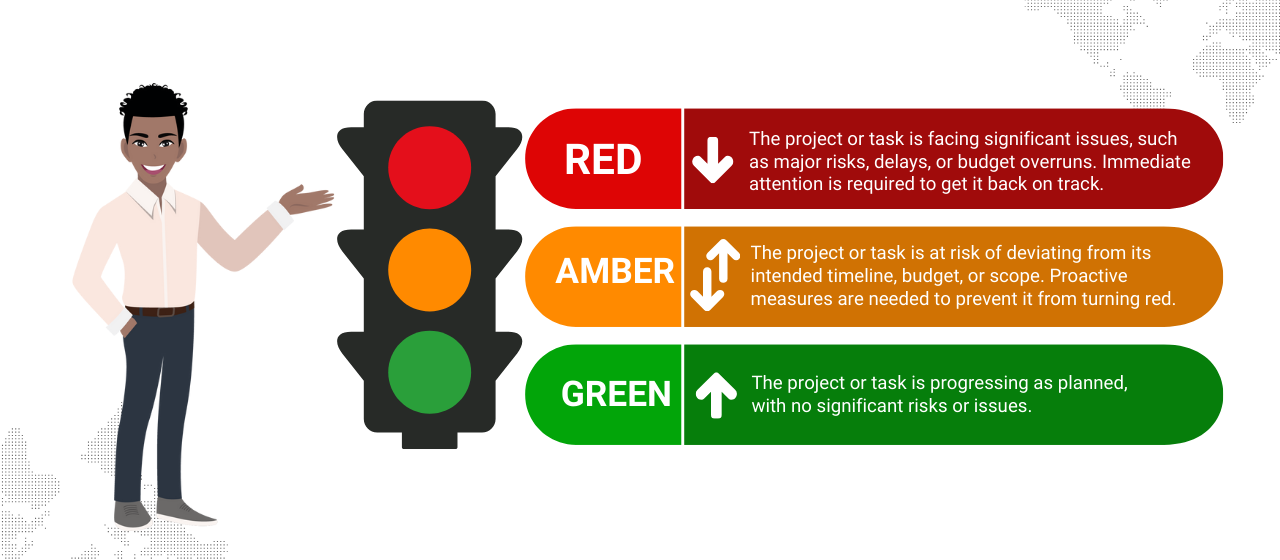
Imagine you’re watching a traffic light — red 🔴, yellow (or amber) 🟡, and green 🟢. These colors are a quick way to tell you how things are going, right? In project management, we use the same idea with something called RAG status.
🔴 Red means stop, serious problem — something is not right and needs urgent attention.
🟡 Amber (or yellow) is caution — things are not perfect, but we can still fix them before they get worse.
🟢 Green is go — everything is on track, and the project is moving smoothly.
This simple system helps teams and leaders easily see at a glance where their project stands. It’s a powerful, visual way to catch problems early, keep everyone informed, and make smarter decisions. 💡📊
In short, RAG status isn’t just about colors. It’s about clear communication, quick awareness, and keeping projects healthy and successful. ✅📈
In project management, RAG stands for Red, Amber, Green, which is a simple and widely used status reporting framework to indicate the current status of a project, task, or milestone. Here’s a breakdown of what each color signifies:
Red
- Status: Critical
- Indication: The project or task is facing significant issues, such as major risks, delays, or budget overruns. Immediate attention is required to get it back on track.
- Example: A critical dependency is delayed, or a key team member has left the project.
Amber
- Status: Caution or Warning
- Indication: The project or task is at risk of deviating from its intended timeline, budget, or scope. Proactive measures are needed to prevent it from turning red.
- Example: A minor delay in one task could impact the overall project timeline if not addressed.
Green
- Status: On Track
- Indication: The project or task is progressing as planned, with no significant risks or issues.
- Example: All milestones are being met, and the team is confident about delivering on time and within budget.
Why is RAG Used in Project Management?
- It provides a quick and clear visual indicator of project health.
- It helps stakeholders focus on critical issues (red) while monitoring potential risks (amber).
- It simplifies communication and decision-making.
Key Points to Remember
- Red = Urgent action required.
- Amber = Warning; plan mitigation.
- Green = Everything is on track.
This framework is particularly useful for project managers and stakeholders to quickly assess the status of multiple projects or tasks at a glance.